For weddings, birthdays and every big Nigerian party

Everyone on the list. Everyone in the right seat.

Eventilize keeps your guest list, your seating plan and your front door in one place. Guests get their pass on WhatsApp. Ushers scan it at the gate and tell them their table.

Free for up to 50 guests. No card needed.

  • Passes on WhatsApp, SMS and email
  • Check-in keeps working when the network drops
  • Seating drawn to the size of your hall
  • Built for the Nigeria Data Protection Act

The gate is where parties go wrong

You planned the food, the band and the colours. Then the doors open.

  • A printed list with 400 names, three versions of the seating, and pen marks everywhere.
  • A man at the gate says he is on the list. Nobody can check, so he walks in.
  • The groom’s mother added 30 people last night. The caterer finds out at 6pm.
  • Your cousin is at the door with a phone torch, looking for one name.
  • Eventilize handles the part nobody plans for: getting the right people through the door and into the right seats.

How it works

Four steps, from the first name on the list to the last guest through the door.

  1. Build the list

    Add guests yourself, import a spreadsheet, or share a sign-up link with a cap. Parents can fill the tables you give them.

  2. Plan the hall

    Draw the room to scale, drag the tables in, then drag guests onto them. A family of four takes four seats.

  3. Send the passes

    Every guest gets a QR pass on WhatsApp, SMS or email. Turn on reminders for a week before, a day before and the morning of.

  4. Check them in

    Ushers scan passes on their own phones and see the name and table straight away. No signal? They keep going.

What you get

Guest list

One list, however it grows

Guests come from everywhere: your phone contacts, a spreadsheet from the groom’s family, people signing up from a flyer. They all end up in the same list.

  • Import from Excel or CSV and map the columns
  • Let guests sign up with a link, up to a limit you set
  • Plus-ones, families on one pass, and “Bride’s side” or “VIP” labels
  • Search, filter and export the whole list when the caterer asks
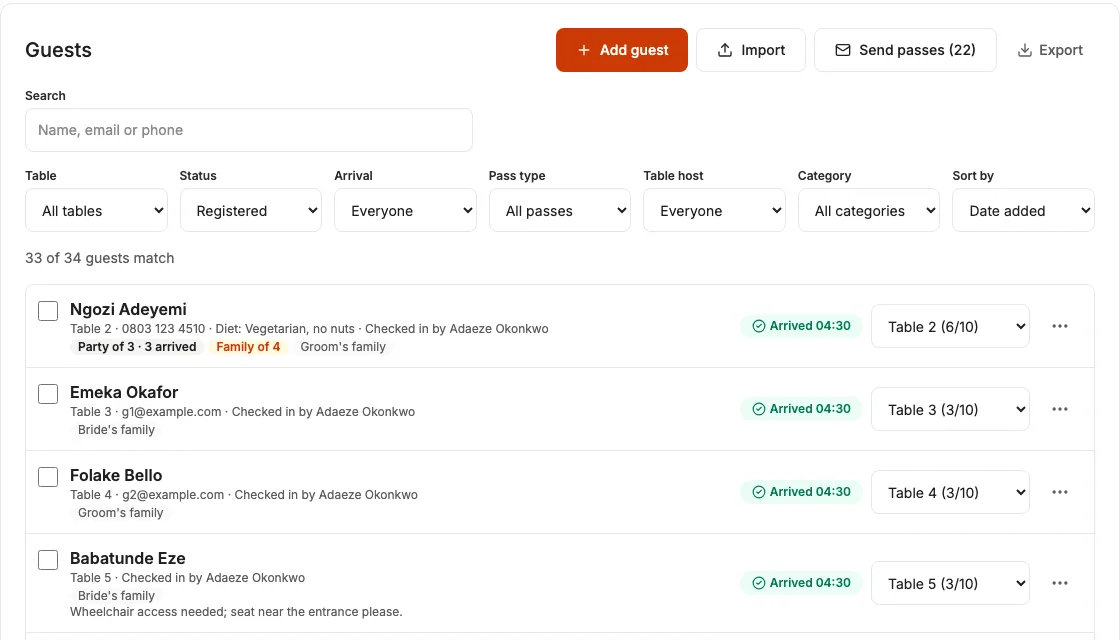
The guest list: each guest with their table, arrival time and party size

Seating

A seating plan that matches the room

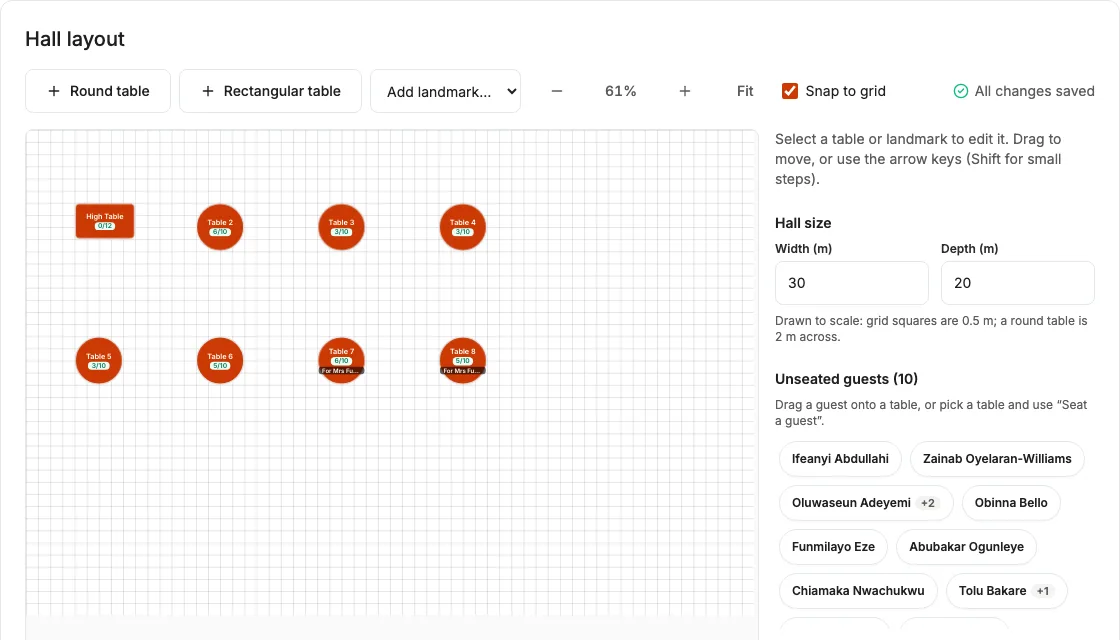
Tell us the hall is 30 by 20 metres and the plan is drawn to that size. You see what fits before the decorators arrive.

  • Drag tables in, then drag guests onto them
  • Tables show how full they are, and refuse to overfill
  • Seat a whole spreadsheet at once if you already planned it
  • Print the plan or save it as a PDF for the hall manager
The hall layout editor with round tables, a high table and a list of guests still to seat

Passes

Passes people actually open

People in Nigeria read WhatsApp. So that is where the pass goes, with SMS as a backup and email as a copy.

  • Guests choose WhatsApp or SMS when they sign up
  • You see who received, read or missed their pass
  • You see the cost before you send anything
  • Guests can stop messages or delete their details any time
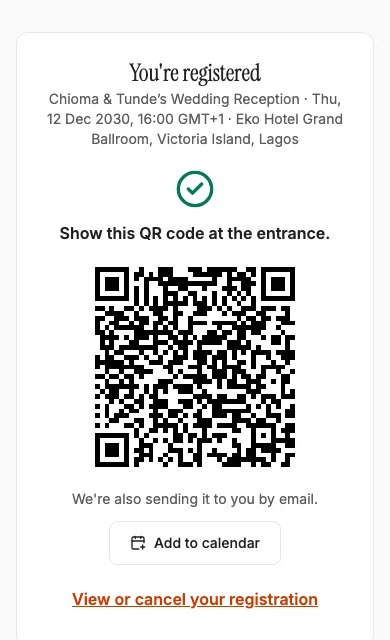
A guest’s phone showing their QR pass after registering

At the gate

Fast at the gate, even offline

The gate is where queues and arguments start. Ushers open a link on their own phones, enter a PIN and start scanning. No app to install.

  • The guest list downloads to the phone before doors open
  • Scans keep working in a dead zone and sync when the signal returns
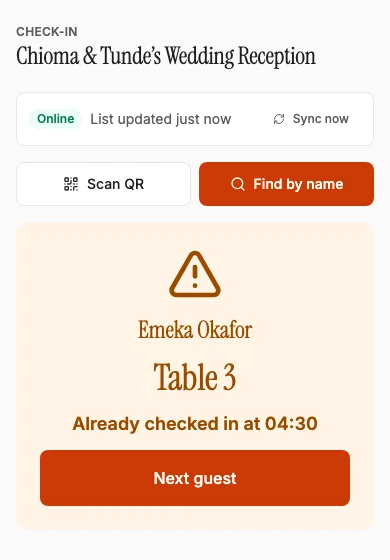
  • Scan the same pass twice and the usher is warned at once
  • Families can arrive in parts on one pass
An usher’s phone warning that a guest has already checked in, with their table number

Table hosts

Let the parents fill their own tables

Give Mummy two tables and a link. She adds her guests from her phone. You stop collecting names on WhatsApp.

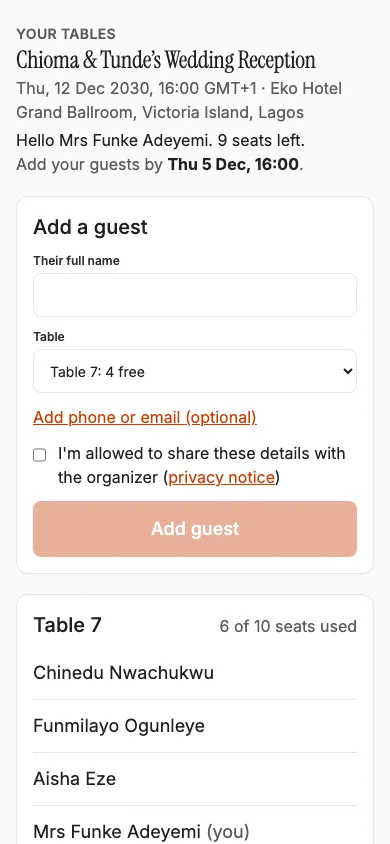
  • Each host sees only their own tables and seats left
  • They can add, remove and fix names until a deadline you set
  • They can’t go past the table size or the event limit
  • You see who added whom, and can change anything
A table host’s phone showing their two tables and an add-a-guest form
  • Plan with your team

    Add co-planners who can edit, and viewers who can only look. You choose who sees phone numbers.

  • A printed gate kit

    One click prints usher instructions, gate cards and a backup list by name and by table.

  • Live arrivals

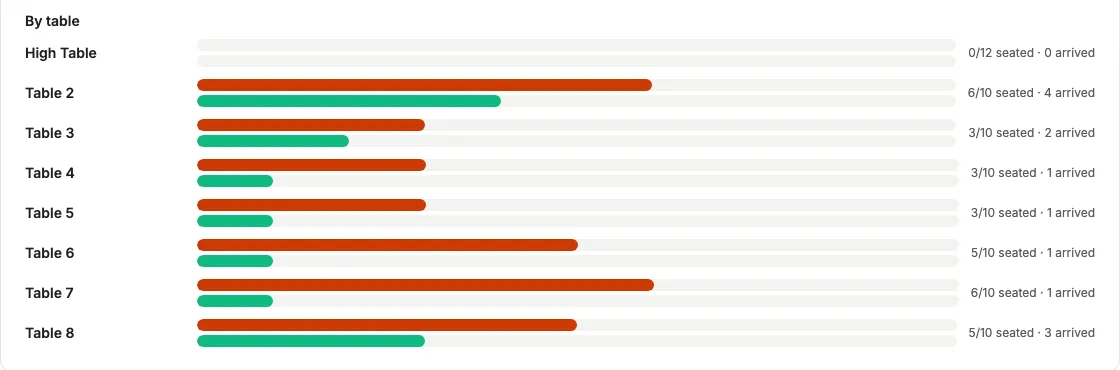
    Watch the hall fill up, table by table, while the event is running.

Arrivals by table: how many guests are seated at each table and how many have arrived

Made for owambe-sized events

From 50 close friends to 1,000 guests across three gates.

  • Weddings

  • Birthdays and anniversaries

  • Burials, launches and church events

Pay per event, in naira

No subscription. Each event has its own pass. Start free and upgrade when your list grows. You only pay the difference.

  • Free

    ₦0

    free, per event

    • Up to 50 guests
    • Passes by email
    Start free
  • Most weddings

    Standard

    ₦18,000

    once, per event

    • Up to 200 guests
    • 600 WhatsApp and SMS messages
    • Unlimited email
    Start free
  • Premium

    ₦45,000

    once, per event

    • Up to 500 guests
    • 1,500 WhatsApp and SMS messages
    • Unlimited email
    Start free
  • Large

    ₦90,000

    once, per event

    • Up to 1,000 guests
    • 3,000 WhatsApp and SMS messages
    • Unlimited email
    Start free

Every pass includes

  • Seating plan and printouts
  • QR check-in that works offline
  • Usher links for every gate
  • Table hosts
  • Co-planners and viewers
  • Excel and CSV import and export

Pay by card, bank transfer or USSD through Paystack. Event passes are refundable in full within 7 days of purchase if no WhatsApp or SMS messages have been sent for the event and it has not started. Duplicate payments are always refunded. Contact support with your payment reference.

Your guests’ details stay yours

  • Nothing is deleted behind your back. After the event, we ask whether you want to keep or delete the list.
  • Guests only get WhatsApp or SMS if they said yes. They can stop messages or delete their details from their own pass page.
  • Ushers and table hosts see names and tables, not phone numbers.
  • Read how we handle data

Questions people ask

Do guests need to download an app?

No. Their pass comes on WhatsApp, SMS or email and opens in the phone’s browser.

Do ushers need an app?

No. You send each gate a link and a PIN. They open it on their own phone and start scanning. They can add it to their home screen if they like.

What if the network is bad at the venue?

Ushers open their link once before doors open, while there is signal. After that, check-in works with no connection and syncs when the signal comes back. You can also print a backup list.

What if two ushers scan the same person?

The second usher is told the guest is already in, and at what time. If it happens offline, the duplicate is flagged when the phones sync, so you can see it.

Can family members add their own guests?

Yes. Make them a table host. They get a link and a code, and can only add people to the tables you gave them.

How do I pay?

Each event has its own pass, paid once in naira by card, bank transfer or USSD through Paystack. If your guest list grows, you upgrade and pay only the difference.

What happens to guest details after the event?

Nothing is deleted on its own. After your event we ask whether you want to keep or delete the guest list. Guests can delete their own details too.

Can I try it before paying?

Yes. Every event is free for up to 50 guests, with email passes and everything else included. No card needed.

Start with the guest list

Set up your event in a few minutes. Add your first 50 guests for free.

Create your first event